'/%3E%3C/svg%3E)
'/%3E%3Cpath%20fill='%23b2b2b2'%20d='M241%20382q0%2016%2017%2026%2017%2011%2042%2011t42-11q16-11%2017-26V269H241'/%3E%3Cpath%20fill='%239f7e00'%20d='M241%20379q0%2014%208%2023%209%209%2021%209%2014%200%2021-9%209-9%209-23V269h-59'/%3E%3Cpath%20d='M241%20339v-70h59v110q0%2014-9%2023l-6%205v-68h-15v72q-8%200-14-4v-68zm59%2040c0%2022%2015%2032%2029%2032%2021%200%2030-18%2030-32v-40h-59'/%3E%3Cpath%20fill='%239f7e00'%20d='M266%20277v5h2v12h-3v-5h2v-5h-9v5h2v5h-4v9h3v18h-5v10h34v-10h-5v-18h3v-9h-4v-5h2v-5h-9v5h2v5h-3v-12h2v-5zm42%20101q0%2010%206%2017%206%206%2015%207%2010-1%2016-7%206-7%206-17v-29h-43'/%3E%3Ccircle%20fill='%230044ad'%20cx='329.5'%20cy='372'%20r='6'/%3E%3Cellipse%20fill='%230044ad'%20cx='300'%20cy='340'%20rx='16'%20ry='21'/%3E%3C/svg%3E)

Step-by-Step Guide: How to Get Your Free Gemini API Key
Google AI Studio provides a developer platform that lets you access Gemini models and generate an API key in under three minutes.
Step 1: Access Google AI Studio
-
Open your browser and go to aistudio.google.com.
-
Sign in with your Google account.
Step 2: Navigate to API Keys
-
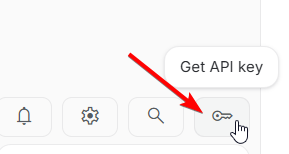
In the left-hand sidebar menu, locate and click on Get API key.
Step 3: Generate Your New Key
-
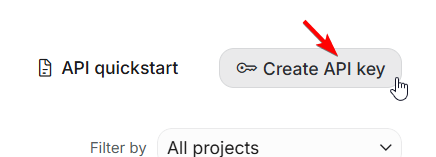
Click the Create API key button.
-
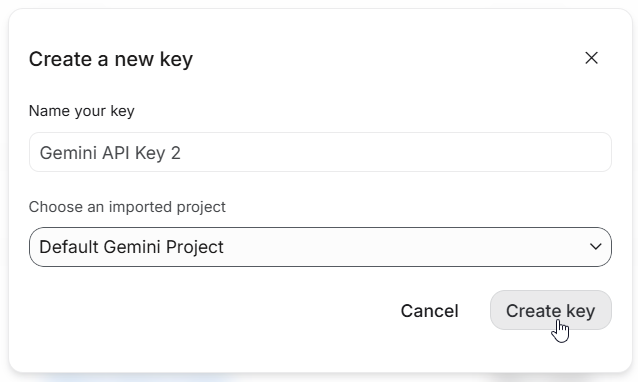
Choose your preferred setup option:
-
Name your key
-
Choose an imported project
-
Step 4: Copy and Secure Your Key
-
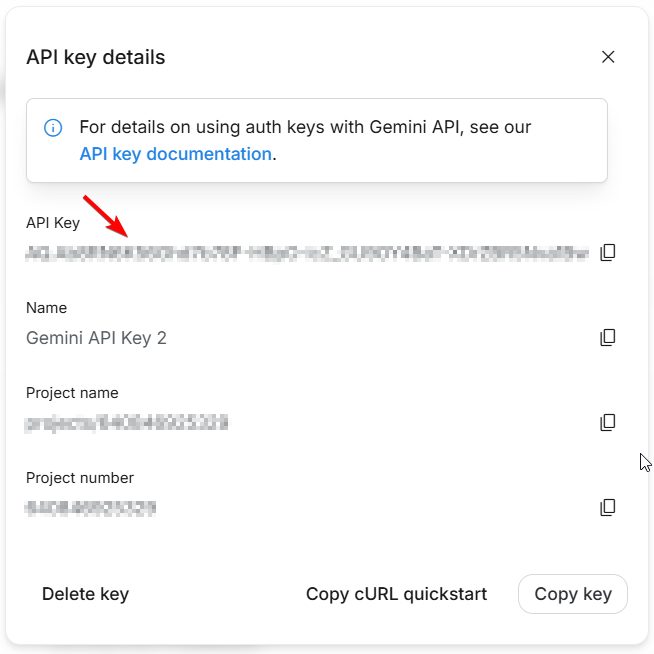
Click Copy to save the generated token to your clipboard.